


Eventleaf Guide
3.18.00 Reviews
App Specs
- Version
- 4.10.4
- Updated On
- License
- Free
- Downloads
- 10,000+
- Developer
- Jolly Technologies Inc
- Categories
- Events
- Platform
- Android
Screenshots
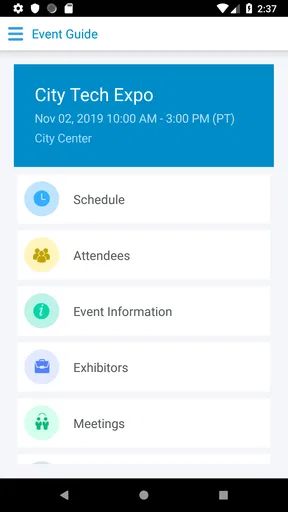
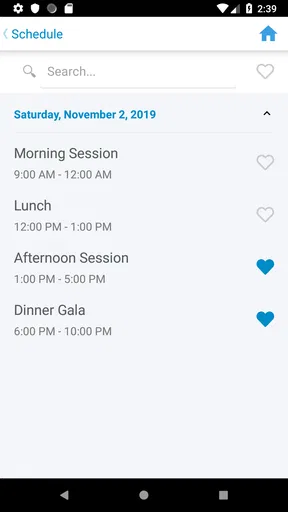
 Analysis by AppCompare
When I decide whether an event app is worth opening, I start with one practical question: can it put the information I need in reach without making me search through messages, printed handouts, and several unrelated tools? Eventleaf Guide is an attendee-focused app from Jolly Technologies Inc, built around viewing event information and documents on a phone or tablet. That narrow job is also its clearest strength: it can give an event a single mobile reference point, provided the organizers have prepared the material for it.
A guide to event information, not a replacement for every tool
I think it helps to set expectations before installing it. Eventleaf Guide is best understood as a companion for an event you are already attending, rather than a general-purpose calendar, map, or networking service that works independently of an event. Its usefulness depends on the event content made available to attendees. If the schedule, venue information, and documents you need are there, having them together on your device can cut down on last-minute searching. If you expect it to replace every other event tool automatically, that is a different expectation.
That distinction matters when choosing between an event-specific guide and the usual alternatives. A calendar app is better for keeping commitments from many parts of your life in one place. Email and a browser may be enough if an event has only a few documents and a simple schedule. A printed program can be easier to consult when you want to avoid using your phone. Eventleaf Guide makes more sense when the event’s own information is the thing you need to check repeatedly, and you would rather have that reference on a phone or tablet than keep hunting for a message or paper sheet.
Why having documents on hand can make a difference
The most useful payoff is not flashy: less friction between having a question and finding the relevant event material. Before leaving for a session, you might want to check a document or confirm which event information you have saved on your device. During a break, you can return to the guide rather than try to reconstruct details from a crowded inbox. That is a small convenience, but at a busy event, small reductions in searching can make the day feel less scattered.
I would also treat the app as a reference, not as a guarantee that every answer is in one place. An event can change, and attendees may still need to follow the organizer’s latest announcements or ask staff for help. My practical advice is to open the guide before you arrive, look through the available information, and note anything that seems incomplete or unclear while there is time to ask. That simple check is more useful than discovering a missing detail when you are already trying to get to the next part of the day.
Your Event Companion
For a realistic example, imagine arriving at a full-day conference with a phone, a bag, and only a few minutes between sessions. You want to check an event document while standing in a queue, then refer to another piece of information during a break. A guide that keeps the event’s material accessible on your phone or tablet can be easier to manage than carrying loose papers or scrolling through a long chain of emails. I would still keep essential travel or booking details somewhere dependable, but the event guide can serve as the working reference for material the organizers have placed there.
This is also where a little preparation helps. If you know you will be relying on your phone, review the guide before the busiest part of the event, when you have time to orient yourself. Make a habit of checking the app when you need event-specific material, while leaving personal appointments and unrelated reminders in the calendar you already use. That division keeps the guide focused instead of turning it into another place where you have to manage your whole day.
Worth Reading Before You Choose

EA SPORTS FC Mobile 26 Is a Bigger Football Game, but It Takes Time

Flipboard Shows What News Apps Must Do Beyond the Feed

Switching to Android Auto Means Rethinking Your Driving Routine

Google Calendar Makes a Crowded Week Easier to Manage

Ludo King Makes the Most of the Minutes Between Plans

Baby Panda World Brings Quick Play to Modern Phones, but Its Game Library Feels Busy
Eventleaf Guide is free, carries an Everyone age rating, and has a 3.1 average from 23 ratings, alongside 7 written reviews. It has passed 10,000 installs, was released on May 3, 2017, and its current version is 4.10.4, with Android 8.0 as the minimum operating system. Those figures give a sense of its reach and history, but I would not use them alone to decide whether it will suit a particular event. The more important question is whether the event you are attending uses the guide in a way that makes its information genuinely useful to you.
Sleek and Intuitive Interface
First things first, the app's interface is a breath of fresh air. It’s sleek, modern, and incredibly intuitive. You don’t need to be a tech wizard to navigate through the menus. Everything is just a tap away, and the design is easy on the eyes, which is crucial when you’re staring at your phone all day.
All-in-One Agenda
One of my favorite features is the customizable agenda. You can easily add sessions to your personal schedule with a tap. The app sends reminders, so you never miss a session, and you can even add notes and bookmarks. It’s like having a digital assistant that remembers everything for you.
For a packed program, a personal agenda is most useful when it helps you make choices before you are rushing between rooms. I would use it to identify the sessions I care about first, then leave space for meals, travel across the venue, or a conversation that runs long. A schedule on a screen can look deceptively tidy; building in breathing room is a better plan than treating every listed start time as a promise that you can arrive at the next session instantly.
There is a trade-off, though: a personal agenda only helps if you keep it aligned with the event’s current information. If a session is moved or a plan changes, check the event’s latest material rather than relying blindly on an earlier mental snapshot. I would use the app’s agenda for choosing what I intend to attend, while keeping an eye on any event updates available to me. That approach makes the schedule a useful planning aid instead of a source of false certainty.
Networking Made Easy
Let’s talk networking. At any event, meeting the right people can be as important as attending the sessions. Eventleaf Guide lets you connect with other attendees through its built-in networking features. You can view profiles, send messages, and even set up meetings—all within the app. It’s perfect for breaking the ice and making meaningful connections.
For anyone using attendee profiles or messages, I would keep the same judgment I use in person: be specific, polite, and respectful of other people’s time. A brief note explaining why you are reaching out is more helpful than a vague request to connect, and an event meeting should have a clear purpose. At the same time, networking through an app is not a substitute for a conversation that happens naturally in a session break. If you dislike messaging people you have not met, you can simply focus on the event information and skip that part of the experience.
Rich Multimedia Content
The app supports a variety of multimedia content, which means you can access speaker presentations, videos, and other resources directly from your phone. During one of the keynote speeches, I was able to download the presentation slides instantly. No more juggling between paper handouts and digital files; everything is organized and accessible.
For people who like to review material later, event documents can be more valuable after a session than during it. I would rather listen carefully and make a short note about what I want to revisit than spend a talk switching between the speaker and a screen. Once the session is over, having the relevant material available through the event guide can make it easier to follow up on a topic, share a useful reference with a colleague, or remember which document belongs to which part of the program.
Phone screens are still small, and long documents may be more comfortable to read on a tablet or a larger display. If you expect to study a presentation in detail, think of the app as a convenient way to find the event material, not necessarily the ideal screen for every kind of reading. That is a practical reason the app’s phone-or-tablet audience matters: the same document can be handy on the move and easier to review on a larger device when you have time.
Venue Maps and More
Getting lost is a thing of the past with the app’s detailed venue maps. I often found myself navigating effortlessly around the conference center, thanks to the interactive maps. You can zoom in, search for specific rooms, and even get directions. It’s like Google Maps, but for events!
Maps are most helpful when you use them before you are under time pressure. If you have a break, check where the next session is and give yourself a moment to understand the route. At an unfamiliar venue, even a useful map does not remove the need to follow signs or ask staff when the layout is confusing. I would use the event map for orientation, then trust on-site directions if something appears to have changed or the route is not obvious.
Easy Feedback and Surveys
Feedback is crucial for event organizers, and Eventleaf Guide makes it easy to collect. The app allows attendees to fill out surveys and provide instant feedback on sessions and speakers. As an attendee, I appreciated having a platform to share my thoughts, knowing they could help improve future events.
If you are asked to complete a survey, the most useful feedback is usually concrete: what helped, what was hard to follow, or what you would change. A quick response while the session is fresh can be more accurate than trying to remember your reaction at the end of a long day. I would keep comments focused and considerate, especially when they concern an individual speaker. That makes feedback more actionable for organizers and avoids turning a simple form into a rushed rating without context.
Security and Privacy
In an era where data privacy is more important than ever, it’s reassuring to see that the app takes security seriously. With secure login options and privacy controls, you can be sure your data is protected. I found the app’s privacy policy transparent and straightforward, which is always a plus.
Even when an event app is convenient, I suggest sharing only what you are comfortable making available to other attendees. Before using profile or messaging options, take a moment to consider what you want people to know and whether you want to participate in networking at all. That is especially sensible if you are attending mainly to learn rather than to make contacts. You can still use the guide for event information without treating every social feature as something you must use.
Who gets the most from it—and who may not
I would recommend this kind of event companion most readily to attendees who expect to consult event-specific information more than once: people moving between sessions, anyone who wants documents close at hand, or visitors who prefer a phone or tablet to a printed program. It is also a sensible choice if an organizer has made the guide central to how attendees access the event material. In that situation, installing it ahead of time and checking its contents can make the day easier to navigate.
On the other hand, if you are attending a short meeting with only one location and a simple schedule, a calendar entry or a single email may be all you need. If you prefer paper, do not want another app on your device, or need a broad personal organizer for events from many different providers, this is not the natural replacement for those tools. The key trade-off is focus: an event-specific guide can keep relevant material together, but it is not a universal home for every commitment or document in your life.
My overall view is that the app’s value comes from how an event uses it, not from installing it in isolation. Before relying on it, I would check that the event information I care about is available and keep another reliable way to access any essential details. If that fits your plans, Eventleaf Guide can be a handy companion rather than another app you forget to open. If the event’s material is already easy to manage elsewhere, there is no need to force it into your routine.
So, is Eventleaf Guide the ultimate event app? In my experience, it certainly checks all the boxes. Whether you’re attending a small workshop or a large-scale conference, this app offers the tools you need to enhance your event experience. It’s efficient, user-friendly, and packed with features that cater to both attendees and organizers.
Next time you’re gearing up for an event, give Eventleaf Guide a try. It might just become your new favorite event companion. And who doesn’t love a little extra help navigating the chaos of event schedules and networking?
Pros
- User-friendly interface simplifies navigation.
- Real-time updates keep information current.
- Customizable schedule for personal planning.
- Networking features enhance attendee interaction.
- Offline access available for event details.
Cons
- Limited to supported event types only.
- Requires internet for initial content sync.
- Some features locked behind paywall.
- Occasional lag on older devices.
- No built-in notification reminders.
FAQs for Eventleaf Guide
What is Eventleaf Guide and how does it work?
Eventleaf Guide is a mobile application designed to enhance attendee experiences at events by providing comprehensive information and interactive features. Users can access event schedules, speaker details, and venue maps. The app allows attendees to personalize their agenda, receive real-time updates, and network with other participants, ensuring a seamless event experience.
Is Eventleaf Guide available on both Android and iOS?
Yes, Eventleaf Guide is available for both Android and iOS devices. Users can download the app from Google Play Store for Android or the Apple App Store for iOS, ensuring a wide range of device compatibility. The app offers similar features across both platforms, maintaining a consistent user experience.
How can I personalize my event experience using Eventleaf Guide?
Eventleaf Guide allows users to customize their event experience by enabling them to create personalized agendas. Users can select sessions of interest, set reminders, and bookmark favorite speakers or exhibitors. This customization helps attendees manage their time effectively and ensures they do not miss important parts of the event.
What networking features does Eventleaf Guide offer?
Eventleaf Guide includes several networking features to enhance attendee interaction. Users can connect with other participants through in-app messaging, view profiles of other attendees, and schedule meetings. These features facilitate professional networking and collaboration, making the app essential for maximizing event participation.
Does Eventleaf Guide require an internet connection to function?
While Eventleaf Guide can operate with limited functionality offline, an internet connection is recommended for the best experience. Features such as real-time updates, messaging, and schedule synchronization require connectivity. Having internet access ensures users receive the latest information and can fully engage with all app features.


